

Eighteeth
Eighteeth Medical E-Connect Endomotor with E-Pex Apex Locator Combo
Eighteeth Medical E-Connect Endomotor with E-Pex Apex Locator Combo
Couldn't load pickup availability
Features
Features
- Cordless Endomotor
- Integrable Apex Locator
- 4th Generation Apex Locator
- Automatic Calibration
- Cordless Endomotor
- Integrable Apex Locator
- 4th Generation Apex Locator
- Automatic Calibration
Description
Description
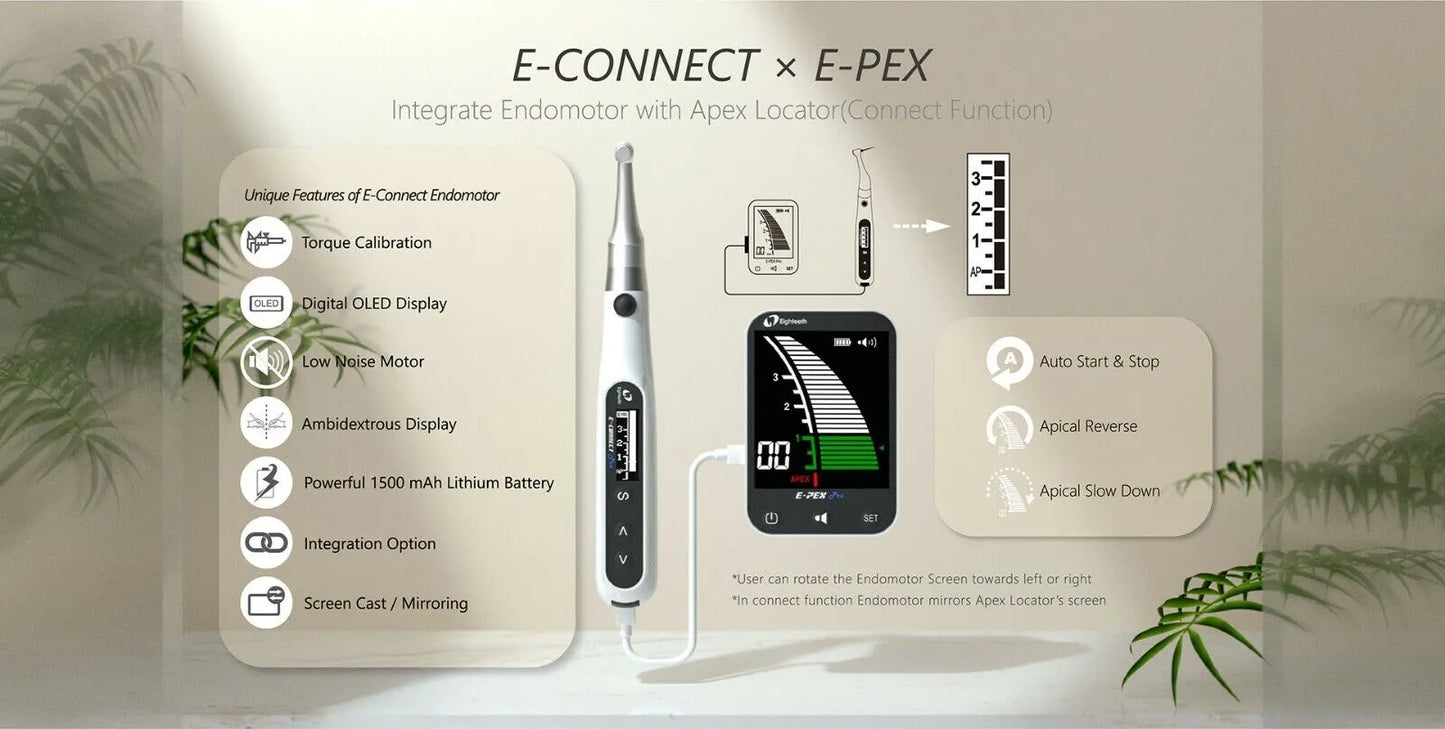
EIGHTEETH E-CONNECT ENDOMOTOR - Eighteeth Medical give the most cost efficient, feature-rich cordless endo motor in the industry to equip you endodontic procedures.
- The contra angle can be 340 degrees rotated, making it easy to watch the LCD in treatment. It gives comfort while working on all teeth
- Miniature Head : Provides excellent visibility while working
- Quick and simple programmable modes for torque, speed, continuous rotation/ reciprocation modes.
- Continuous Mode: 6 Memory Programs to set rotation speed, torque and direction
- Reciprocation Mode: 5 Modes with 4 forward and 1 reverse reciprocation
- Auto Torque Reverse: Reduces the possibility of instrument separation inside the canal
- Reciprocation mode for regular rotary files like Neoendo Flex
- Reciprocation for reciprocatory files
- Ambidextrous: Adjustable for both left and right hand operations
- Torque Calibration: In-built in the endomotor
Functions activated when integrated with E-PEX (apex locator)
- Auto Start-stop- Motor starts moving when the file enters the canal and stops when withdrawn
- Apical Reverse- When the file reaches pre-set apical reverse point, user can define wether the fle starts moving in reverese direction
- Apical Slow Down- To preserve the cemento dental junction and avoid file-separation, speed of motor slows down when the file is near apical region
- Apical Torque Reduction- In addition to apical slow down, torque reduction at apical third prevents chances of file separation.
EIGHTEETH E-PEX APEX LOCATOR
- 4th Generation - Based on advanced multi-frequency network impedance measurement technology
- LCD Display: Bright and clear display
- High precision of apical foramen localization in wet and dry canals
- Automatic calibration: Ensures stable and accurate measurements
- Compact size and stable design allows for excellent flexibility during procedures
- Adjustable keys and alarm volume
- Bright LCD with color-coded measurements:
* When the file reaches the front region of the apical foramen, the screen displays the white indicated strips
* When the file reaches the position nearby the apical foramen, the screen displays the green indicated strips
* When the screen light the red indicated strips, means the file has exceeded the apical foramen, a rapid beep sound will be generated at the same time
Functions activated when integrated with E-CONNECT(endomotor)
- Auto Start-stop- Motor starts moving when the file enters the canal and stops when withdrawn
- Apical Reverse- When the file reaches the pre-set apical reverse point, user can define whether the file starts moving in a reverse direction
- Apical Slow Down- To preserve the cemento dental junction and avoid file-separation, speed of motor slows down when the file is near apical region
- Apical Torque Reduction- In addition to apical slow down, torque reduction at apical third prevents chances of file separation.
Specification
Specification
Eighteeth Medical E-Connect Endomotor
Model Number
E-CONNECT
Rotational Speed Range
120-650 RPM
Torque Range
0.5 – 4.0 Ncm
Adaptor Working Voltage
AC 100-240v, 50/60 Hz
Battery Capacity
1600 mAh
Eighteeth Medical E-Pex Apex Locator
Model Number
E-PEX
Screen
3.5 inch LCD
Battery Capacity
1500mAh
Adaptor Working Voltage
AC 100-240v, 50/60 Hz
Dimensions
95mm X 65mm X 20mm
Packaging
Packaging
Charge the Batteries:
- Ensure that both the endomotor and apex locator batteries are fully charged before beginning the procedure.
Assemble the Handpiece:
Connect the contra angle handpiece to the E-Connect Endomotor securely.
Power On the Endomotor:
- Turn on the E-Connect Endomotor using the designated power button.
Select Operating Mode:
- Choose the operating mode (continuous or reciprocation) based on the requirements of the procedure.
Set Parameters:
- Adjust the rotational speed and torque settings according to the specific needs of the root canal treatment.
Insert Endodontic File:
- Gently insert the endodontic file into the canal, ensuring it is securely in place.
Utilize Integrated Features (with E-Pex Apex Locator):
- Take advantage of integrated features such as auto start-stop, apical reverse, slow down, and torque reduction for enhanced precision and safety.
Complete the Procedure:
- Conduct the endodontic procedure, monitoring the LCD screen for relevant information and adjusting settings as needed.
Auto Calibration:
- Allow the E-Pex Apex Locator to perform automatic calibration for accurate measurements.
Set Preferences:
- Configure preferences such as alarm volume and adjust keys to your liking.
Insert Endodontic File:
- Simultaneously with the E-Connect Endomotor in use, insert the endodontic file into the canal.
Monitor LCD Screen:
- Observe the 3.5-inch LCD screen for color-coded measurements, indicating the file's position relative to the apical foramen.
Utilize Integrated Features (with E-Connect Endomotor):
- Take advantage of features like auto start-stop, apical reverse, slow down, and torque reduction for a more coordinated and controlled procedure.
Complete the Root Canal Treatment:
- Follow the screen indications and complete the root canal treatment with confidence.
Direction to use
Direction to use
Charge the Batteries:
- Ensure that both the endomotor and apex locator batteries are fully charged before beginning the procedure.
Assemble the Handpiece:
Connect the contra angle handpiece to the E-Connect Endomotor securely.
Power On the Endomotor:
- Turn on the E-Connect Endomotor using the designated power button.
Select Operating Mode:
- Choose the operating mode (continuous or reciprocation) based on the requirements of the procedure.
Set Parameters:
- Adjust the rotational speed and torque settings according to the specific needs of the root canal treatment.
Insert Endodontic File:
- Gently insert the endodontic file into the canal, ensuring it is securely in place.
Utilize Integrated Features (with E-Pex Apex Locator):
- Take advantage of integrated features such as auto start-stop, apical reverse, slow down, and torque reduction for enhanced precision and safety.
Complete the Procedure:
- Conduct the endodontic procedure, monitoring the LCD screen for relevant information and adjusting settings as needed.
Auto Calibration:
- Allow the E-Pex Apex Locator to perform automatic calibration for accurate measurements.
Set Preferences:
- Configure preferences such as alarm volume and adjust keys to your liking.
Insert Endodontic File:
- Simultaneously with the E-Connect Endomotor in use, insert the endodontic file into the canal.
Monitor LCD Screen:
- Observe the 3.5-inch LCD screen for color-coded measurements, indicating the file's position relative to the apical foramen.
Utilize Integrated Features (with E-Connect Endomotor):
- Take advantage of features like auto start-stop, apical reverse, slow down, and torque reduction for a more coordinated and controlled procedure.
Complete the Root Canal Treatment:
- Follow the screen indications and complete the root canal treatment with confidence.
Additional info
Additional info
- Country of Origin: PRC
- Manufacturer: Eighteeth
Warranty
Warranty
Product Related Questions
Product Related Questions
Share